Let’s face it: the way we work has changed forever. The days of everyone sitting in the exact same office building from nine to five are quickly fading away. Today, remote and hybrid work models are the new normal. While this flexibility is wonderful, it brings up a massive challenge: how do you keep a team connected, organized, and moving in the same direction when everyone is scattered across different towns, cities, or even time zones?
This is exactly why digital collaboration tools have become the absolute heartbeat of the modern workplace. Without them, trying to coordinate a project feels like total chaos. You end up drowning in endless email threads, losing track of important files, and missing deadlines because of simple miscommunications. Investing in the right team software isn’t just about buying a new digital tool—it’s about giving your team a shared digital home where they can think, build, and succeed together.
Why Collaboration Tools Matter to Real People

When a business grows, communication naturally gets messy. Traditional methods like phone calls and basic email chains simply cannot keep up with the speed of today’s projects. People get left out of loops, files get buried in personal download folders, and misunderstandings slow everything down.
Smart collaboration tools solve this by bringing your entire business operation into one centralized, highly transparent digital hub. Instead of guessing who is working on what, anyone on the team can log in and instantly see the real-time status of a project. This level of openness does wonders for team morale. It removes the stress of the unknown, builds trust across departments, and ensures that every single employee stays perfectly aligned with the company’s bigger goals.
Microsoft Teams: The Ultimate Corporate Hub
For organizations that already live and breathe inside the Microsoft ecosystem, Microsoft Teams is usually the go-to workspace. It is far more than just a basic chat application; it is a massive corporate communication engine that pulls text messaging, face-to-face video calls, secure file sharing, and project planning into one single screen.
Because Teams is deeply connected to Microsoft 365, you can open a Word document or an Excel spreadsheet right inside your chat window and edit it simultaneously with your colleagues during a live meeting. Its structured setup of dedicated team channels keeps distinct projects separate, making it an incredibly reliable anchor for large enterprises and distributed corporate teams that need to maintain top-tier productivity without switching between a dozen different apps.
Slack: Making Work Conversations Feel Natural

If Microsoft Teams is the formal corporate conference room, Slack is the lively, creative studio space. Slack completely revolutionized the business world by turning formal, stuffy work communication into fast, casual, and highly organized text conversations.
[Company Workspace]
       ├── #announcements  (Company-wide news)
       ├── #project-alpha   (Cross-functional team chat)
       ├── #design-feedback (Quick visual reviews)
       └── #watercooler     (Casual human connection)
The true beauty of Slack lies in its use of dedicated public and private channels. Instead of sending an email to ten people and waiting hours for replies, you can drop a quick note in a specific project channel and get answers in seconds. Plus, Slack connects seamlessly with hundreds of other apps. It can automatically pull in updates from your calendar, track sales leads, or ping your team when a new customer submits a support ticket, making it an absolute favorite for fast-moving startups and modern remote teams.
Asana: Bringing Order to Project Chaos
Have you ever managed a project where no one was entirely sure who was responsible for the next step? Asana was built specifically to kill that confusion. It is an incredibly powerful project management platform that helps teams map out complex workflows, assign clear responsibilities, and track task deadlines with total clarity.
Asana allows you to view your work in whatever way makes the most sense to your brain—whether you prefer a clean list, a visual board, or a detailed timeline calendar. By setting up clear task dependencies, a graphic designer will automatically get a notification the exact second a copywriter finishes writing the text for a new ad campaign. This eliminates the need for constant, annoying check-in meetings and keeps projects moving forward smoothly.
Trello: The Visual Way to Track Daily Tasks
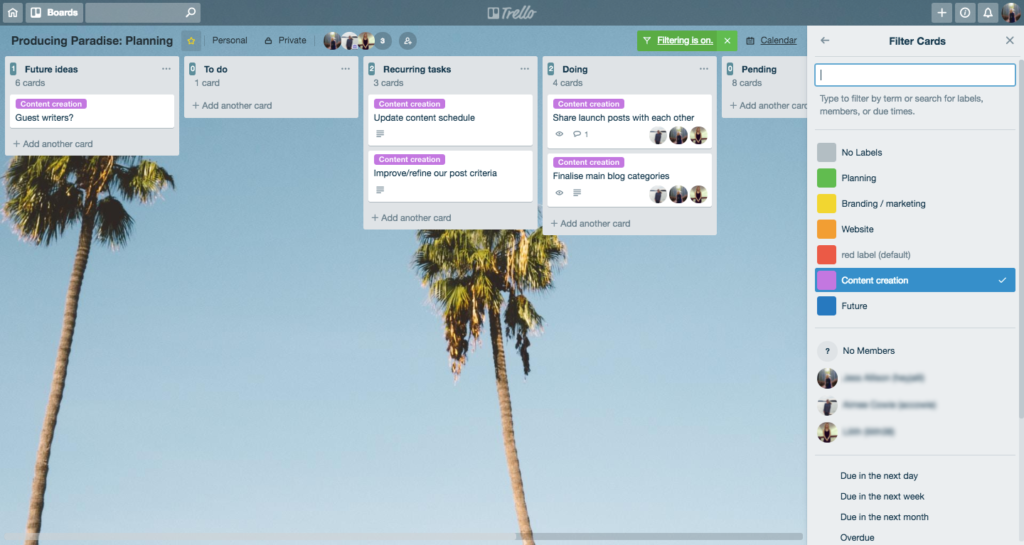
Not every project needs a massive, deeply complex management system. Sometimes, you just need a straightforward way to see what needs to get done today. That is where Trello shines. It uses a beautifully simple digital board-and-card system based on traditional Japanese Kanban workflows.
[ To-Do List ]          [ In Progress ]          [ Completed ]
┌────────────┐          ┌────────────┐          ┌────────────┐
│ Write Blog │ ────►    │ Design Art │ ────►    │ Launch Ad  │
└────────────┘          └────────────┘          └────────────┘
Inside Trello, every project is a board, every stage is a list, and every individual task is a card. You can write notes on a card, attach files, set a due date, and then physically drag and drop that card from “To-Do” to “In Progress” to “Done.” It is so intuitive that anyone can master it in five minutes, making it the perfect choice for small creative agencies, freelancers, and small businesses that want visual organization without a steep learning curve.
ClickUp: The All-In-One Productivity Powerhouse
On the opposite side of the spectrum is ClickUp, a platform built for teams that are completely tired of paying for ten different software subscriptions. ClickUp’s bold promise is to replace all of them by combining project tracking, document editing, goal setting, and team chat into one massive, hyper-flexible workspace.
Because it is so customizable, every department in your company can set up ClickUp to match their unique style. Your software engineering team can track bugs using advanced technical charts, while your marketing team uses visual boards to plan social media posts—all within the exact same software. It is a fantastic option for growing companies that want a single source of truth for all their company data and daily operations.
Zoom: Bringing Us Face-to-Face from Anywhere

When the world shifted toward remote work, Zoom quickly became a household name—and for good reason. Face-to-face eye contact and body language are vital parts of human communication that get completely lost in text messages, making high-quality video calls absolutely essential for remote teams.
Zoom keeps things incredibly simple: it delivers crystal-clear video, reliable audio, and effortless screen sharing even on slower internet connections. Whether you are running a quick one-on-one morning check-in, hosting a massive digital webinar for thousands of viewers, or sharing a presentation with an important client, Zoom provides a stable, frictionless experience that makes people feel like they are sitting in the exact same room together.
Google Workspace: The Unbeatable Cloud Playground
When it comes to pure, real-time collaboration on files, Google Workspace remains an absolute king. By bundling together familiar tools like Google Docs, Sheets, Slides, and Drive, it allows teams to create and edit documents together simultaneously in real time.
You can watch your teammate type a paragraph, leave a quick comment on a specific sentence, and jump onto a quick Google Meet video call directly from the document window. There are no confusing “Save” buttons to worry about, and you never have to deal with downloading multiple versions of the same file. Its simplicity, accessibility, and cloud-first design make it a staple for millions of businesses, school systems, and creative teams worldwide.
Notion: Building Your Company’s Shared Brain

Every company has a mountain of scattered knowledge—things like employee handbooks, brand design guidelines, meeting notes, and project goals. Notion acts as a flexible, blank canvas that lets teams pull all of this scattered information into a beautiful, fully searchable digital encyclopedia.
[Notion Company Brain]
       ├── Employee Onboarding Wiki
       ├── Brand Style Guidelines
       └── Weekly Meeting Archives
Notion uses a clean, block-based design that lets you build custom pages, connect internal databases, and create wiki pages easily. Instead of searching through five different apps to find out how your company handles client refunds, an employee can just type a quick search into Notion and find the answer instantly. It is the ultimate tool for knowledge management and keeping remote teams deeply informed.
Monday.com: Visualizing Work Your Own Way
Rounding out the top platforms is Monday.com, a highly visual workflow management tool that focuses on helping teams customize their daily tracking. It moves away from standard spreadsheets, replacing them with vibrant, color-coded dashboards that make project health easy to see at a glance.
Monday.com excels at automating the tedious administrative stuff. You can easily set up rules like: “When a status changes to ‘Stuck,’ automatically send a text alert to the project manager.” By letting the software handle these manual handoffs, departments can cut down on human errors, reduce boring administrative upkeep, and significantly speed up their daily operations.
Choosing Your Perfect Digital Tool
With so many incredible options on the market, it can be overwhelming to pick the right one for your business. To avoid overcomplicating things, look closely at how your team actually works and focus on these core features:
| Key Feature | Why it Matters to Your Team |
|---|---|
| Real-Time Messaging | Cuts down on cluttered email folders and speeds up daily talk. |
| Effortless File Sharing | Keeps the newest versions of your work safe and easy to find. |
| Smart App Integrations | Lets your different software systems share data without errors. |
| Bulletproof Security | Safeguards private client data and company secrets from hackers. |
The Beautiful Payoff of Connected Teams

When you successfully bring the right collaboration software into your business, the entire energy of the workplace shifts for the better.
First, projects get completed much faster because workers no longer have to wait hours for an email reply just to take the next step. Misunderstandings drop drastically because conversations are kept public and organized inside dedicated channels. Most importantly, it creates a far more inclusive and flexible work environment. Parents can pick up their kids from school, and digital nomads can work from different cities, all while staying deeply connected, highly productive, and completely in sync with their teams.
A Sneak Peek at Tomorrow’s Work
As we look toward the future, these digital workspaces are going to get even smarter thanks to deep integrations with Artificial Intelligence. We are moving quickly into an era where software handles the heavy mental lifting of project organization.
Imagine missing a long morning meeting because you were helping a client. Instead of spending an hour watching a recorded video of the call, an AI project assistant will instantly hand you a bulleted summary of what was discussed, list the exact choices that were made, and automatically add new action items directly onto your personal to-do list. This shift will make our digital tools less like passive text boxes and more like proactive, intelligent workplace partners.