The corporate world has officially moved past the chaotic transition of remote work and settled into a mature, hybrid reality. Today, the success of a business doesn’t depend on everyone sitting in the same office building; it hinges on how seamlessly people can collaborate across different time zones, backgrounds, and environments. Digital workspaces have evolved from mere chat logs and video windows into highly integrated, intelligent environments that serve as the actual headquarters for modern companies.
+------------------------+-------------------------------------+-----------------------------------+
| Collaboration Shift    | Legacy Workspaces (Pre-2026)        | Modern Intelligent Ecosystems     |
+------------------------+-------------------------------------+-----------------------------------+
| Communication          | Fragmented emails and basic chats   | Context-aware, continuous streams |
| Project Management     | Manual status updates and tracking  | Predictive, automated workflows   |
| Meeting Culture        | Exhausting back-to-back live video  | Asynchronous, AI-summarized briefs|
| Data Infrastructure    | Isolated local/cloud folders        | Living, semantic knowledge bases  |
+------------------------+-------------------------------------+-----------------------------------+
In this landscape, the sheer volume of standalone apps has become a burden rather than a benefit. Teams are no longer looking for just another chat app or an isolated spreadsheet tool. Instead, businesses are aggressively shifting toward unified collaboration hubs that bring communication, task management, asset storage, and operational data under a single digital roof. This consolidation reduces the cognitive friction of constantly switching contexts, allowing employees to spend less time managing their tools and more time driving actual revenue and innovation.
Why Intelligent Collaboration Hubs are Non-Negotiable

The cost of poor communication isn’t just a minor annoyance; it directly impacts a company’s bottom line. When project details are scattered across personal text threads, long email chains, and forgotten local files, teams suffer from costly misunderstandings, missed deadlines, and severe operational silos. Centralized collaboration platforms eliminate this chaos by providing a single, verifiable source of truth for every project, client, and internal initiative.
Beyond keeping projects organized, these platforms play a massive role in employee retention and corporate culture. In a world where teammates might never meet face-to-face, the digital tools a company provides dictate the entire daily employee experience. A smooth, intuitive digital workspace fosters psychological safety and transparency, making it easy for team members to ask questions, share rough ideas, and celebrate wins. By automating repetitive administrative tasks, these tools preserve your team’s mental energy, drastically reducing burnout and allowing individuals to focus on deep, fulfilling creative work.
Microsoft Teams: The Enterprise Command Center

For organizations heavily invested in the traditional corporate ecosystem, Microsoft Teams functions as the definitive operational backbone. It has evolved far beyond a basic video conferencing application, morphing into a comprehensive ecosystem coordinator. By deeply embedding itself within the Microsoft 365 suite, Teams allows enterprise employees to co-author intricate spreadsheets, review corporate presentations, and manage complex internal databases directly inside the active chat window, ensuring that workflow momentum is never interrupted.
  [Corporate Security Protocol] ---> [Microsoft Teams Core Enclave] ---> [Integrated M365 Data]
                                               |
                                               v
                             [Automated Compliance Log Generation]
The true differentiator for Teams lies in its enterprise-grade security architecture and its deployment of advanced automated meeting transcription engines. These systems don’t just record audio; they actively analyze corporate meetings, identify individual speaker notes, map out actionable items, and automatically update company planners. For mid-to-large-scale operations with stringent regulatory compliance standards, the platform’s sophisticated data governance policies, localized data residency options, and multi-factor authentication protocols make it a reliable choice for protecting sensitive corporate data.
Slack: Cultivating High-Velocity Asynchronous Culture
For fast-moving startups and agile, tech-forward engineering teams, Slack remains the undisputed gold standard for organizational communication. The platform’s philosophy centers around breaking down rigid corporate hierarchies through open, highly accessible themed communication channels. Rather than burying critical project developments inside private, two-way email threads, Slack encourages teams to conduct their operations in public spaces, creating an organic, searchable repository of institutional knowledge over time.
Operational Insight: High-growth teams win through velocity, not bureaucracy. Slack shifts the paradigm from rigid scheduled meetings to continuous, organic asynchronous alignment.
The real strength of the platform lies in its unmatched third-party application marketplace and advanced workflow builders. Non-technical managers can easily design complex automated workflows—such as triggering customer support alerts, tracking development bugs, or orchestrating new-hire onboarding steps—without writing a single line of code. Furthermore, its ultra-fast, intelligent indexing search algorithms ensure that historical project contexts, uploaded assets, and critical past conversations are instantly retrievable with simple, everyday search phrases.
Google Workspace: The Cloud-Native Collaboration Pioneer
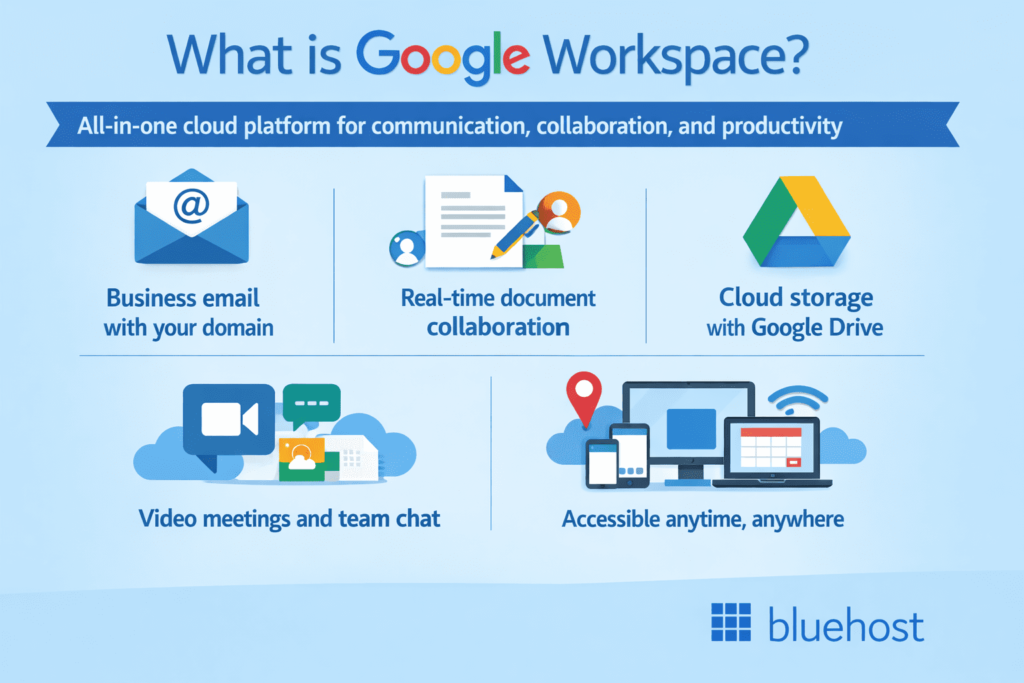
When it comes to frictionless, real-time collaboration, Google Workspace continues to set the benchmark for simplicity and speed. Built entirely on a browser-first, cloud-native foundation, Workspace eliminates the headache of version control completely. Multiple team members can work within the exact same document, spreadsheet, or presentation deck simultaneously, seeing edits manifest down to the millisecond, which effectively removes the old nightmare of dealing with conflicting duplicate files.
  [Teammate A Input] \
  [Teammate B Input] --+---> [Unified Living Google Doc] ---> [Instant Cloud Version Sync]
  [Teammate C Input] /
The underlying beauty of Workspace is its complete lack of learning friction. The clean, minimalist user interface across Gmail, Drive, Docs, and Meet ensures that new hires can jump in and contribute immediately, regardless of their technical background. It serves as an ideal baseline for distributed global organizations that require a stable, lightweight infrastructure capable of operating flawlessly on any device, anywhere in the world, without requiring heavy local software installations.
Asana: Mastering Complex Project Governance

For marketing directors, product managers, and creative directors handling dozens of moving parts, Asana provides the structural framework necessary to keep projects from going off the rails. It approaches collaboration through the strict lens of task accountability and timeline visualization. Instead of hoping team members remember their verbal commitments, Asana maps out every single deliverable, assigning clear ownership, setting explicit dependencies, and establishing hard deadlines on a centralized dashboard.
The platform excels at translating complex, multi-phased initiatives into intuitive Gantt charts and interactive timelines. This visual clarity makes it incredibly easy for leadership to spot potential resource bottlenecks before they stall a project. Furthermore, its automated workload tracking features give managers a high-level view of individual team capacity, ensuring tasks are distributed fairly and preventing top performers from getting overwhelmed.
Trello: The Ultimate Visual Kanban Workflow
Not every project requires a heavy, feature-dense enterprise management system. For small teams, solo entrepreneurs, and creative groups who think visually, Trello provides a refreshing, highly tactile approach to task organization. Utilizing a classic Kanban board architecture, Trello organizes workflows into clear, vertical lists populated by individual, drag-and-drop cards that represent specific tasks or ideas.
+--------------------------+--------------------------+--------------------------+
| To-Do Queue              | In-Progress Development  | Completed Milestones     |
+--------------------------+--------------------------+--------------------------+
| [Task Card: Asset Audit] | [Task Card: UX Review]   | [Task Card: Launch PR]   |
| [Task Card: Copy Draft]  |                          |                          |
+--------------------------+--------------------------+--------------------------+
This structural simplicity allows anyone to understand a project’s exact operational status in a matter of seconds. Each card acts as a self-contained collaborative folder where users can leave comments, attach relevant design assets, create custom checklists, and assign due dates. Trello’s low barrier to entry makes it a powerful option for rapidly brainstorming concepts, running agile development sprints, or managing content calendars without getting bogged down in software complexity.
Notion: Building the Collective Corporate Mind

As a company grows, its internal documentation, standard operating procedures (SOPs), and tribal knowledge inevitably become scattered and lost. Notion solves this issue by acting as an infinitely customizable, all-in-one knowledge base and digital wiki. It moves away from rigid template structures, offering teams a blank canvas constructed of flexible data blocks that can be easily customized to fit virtually any operational workflow imaginable.
Teams rely on Notion to build centralized information repositories that hold everything from company handbooks and brand style guides to engineering databases and roadmap trackers. Its deep linking capabilities allow teams to embed live project trackers directly inside high-level strategy documents, keeping everything connected. By turning static text documents into living, breathing workspaces, Notion ensures that valuable institutional knowledge remains accessible, up-to-date, and useful for the entire team.
Zoom: Beyond the Virtual Conference Room

While originally recognized purely as a utility for video calls, Zoom has successfully expanded into an expansive, all-in-one communications ecosystem. It has systematically addressed the core issue of “virtual meeting fatigue” by layering collaborative tools directly over its world-class video rendering engine. Teams no longer just stare at a grid of faces; they actively brainstorm using persistent digital whiteboards, co-edit shared notes, and manage project chat channels right alongside their video streams.
The real innovation lies in how Zoom uses intelligent automation to optimize meeting times. If a team member misses a call due to a time zone conflict, they no longer have to watch a tedious one-hour recording. Zoom’s built-in automated smart summaries instantly break down long video calls into structured chapters, highlight key decisions, and extract action items labeled by individual names, allowing team members to catch up on missed discussions in less than two minutes.
Key Considerations When Navigating the Tool Market

Selecting a collaboration hub isn’t about picking the option with the most features; it’s about finding the tool that aligns with your team’s natural habits and operational realities. If your company handles highly sensitive client information, your primary filter must be advanced security certifications and end-to-end data encryption. Introducing an insecure tool into your workflow, no matter how visually appealing its interface, represents an unnecessary liability for your brand.
1. Map out your core integration requirements (e.g., CRMs, developer tools).
2. Calculate the true per-user cost across different pricing tiers.
3. Assess the mobile application performance for on-the-go teams.
4. Test the user interface simplicity with non-technical team members.
Next, look closely at your existing software stack and map out cross-platform integration capabilities. A collaboration tool should easily connect with your current CRM, accounting software, or developer repositories; if it functions as an isolated island, it will ultimately slow your team down. Finally, always account for the onboarding learning curve. The best tool on paper is entirely useless if your team finds it too confusing and actively avoids using it in their daily routines.
Proactive Habits for Sustainable Digital Teamwork
Simply buying expensive software will not magically fix a broken company culture. To truly unlock the power of collaboration technology, leadership must establish clear digital etiquette guidelines. Teams need explicit agreements on which channels to use for urgent fire drills versus where to post non-urgent project updates, helping to eliminate the anxiety of constant notifications and allowing employees to disconnect for focused, deep work.
Additionally, companies must commit to regular system-wide digital cleanup audits. Over time, channels become dormant, project boards collect outdated tasks, and cloud storage folders fill up with duplicate files. By scheduling recurring quarterly cleanups to archive old projects and update documentation, you keep your digital workspace fast, organized, and focused on what matters most. Technology works best when paired with intentional habits; when your tools and your culture are aligned, your team can achieve amazing things from anywhere in the world.