Let’s be honest: trying to keep a team on the same page is rarely as simple as sending a quick message and watching the job magically get done.
We have all been there. Someone uploads an important draft to a dead-end email chain. Two people accidentally do the exact same work because nobody updated the master sheet. A client asks for a quick status update, and your entire team spends twenty minutes frantically hunting through four different chat apps and a messy cloud drive just to figure out who is holding the bag.
When your files are scattered across disconnected drives and context gets lost in endless, disjointed message threads, day-to-day productivity takes a brutal hit.
That is precisely where modern team collaboration platforms step in to save our collective sanity.
A good collaboration tool gives your crew a single source of truth. It lets you chat, assign work, share assets, track deadlines, and keep everyone aligned without making people lose their minds. Whether your team sits together in a noisy office, works entirely from home in their sweatpants, or spans across five different time zones, picking the right setup turns daily workplace chaos into a calm, predictable routine.
What Are Team Collaboration Tools, Really?

At their core, team collaboration tools are software platforms designed to eliminate administrative friction so people can focus on doing real, meaningful work.
Instead of forcing you to constantly hop between a dozen disconnected apps throughout the workday, collaboration platforms bring the vital pieces of your daily workflow into one central digital headquarters. Depending on the app you pick, these systems act as an all-in-one virtual office that handles a mix of everyday workplace needs:
- Real-time messaging: Instant group channels, project-specific comment threads, and quick direct messages that keep conversations organized.
- Video and audio huddles: One-click face-to-face calls, quick morning standups, screen-sharing sessions, and recorded video updates.
- Task and project management: Visual Kanban boards, timelines, checklists, task dependencies, and explicit ownership so everyone knows what is due and when.
- Document co-authoring: Live editing, central asset libraries, version histories, and inline feedback comments so teams can write and design together.
- Workflow automation: Simple background triggers that handle repetitive, tedious admin busywork automatically—like moving a card when a task is marked complete or tagging a manager when an approval is needed.
The real goal here isn’t to buy another piece of software just for the sake of having a modern stack. It is about cutting through the noise, dropping the busywork, and giving your team the clarity they need to actually ship work faster.
Top 10 Team Collaboration Tools in 2026
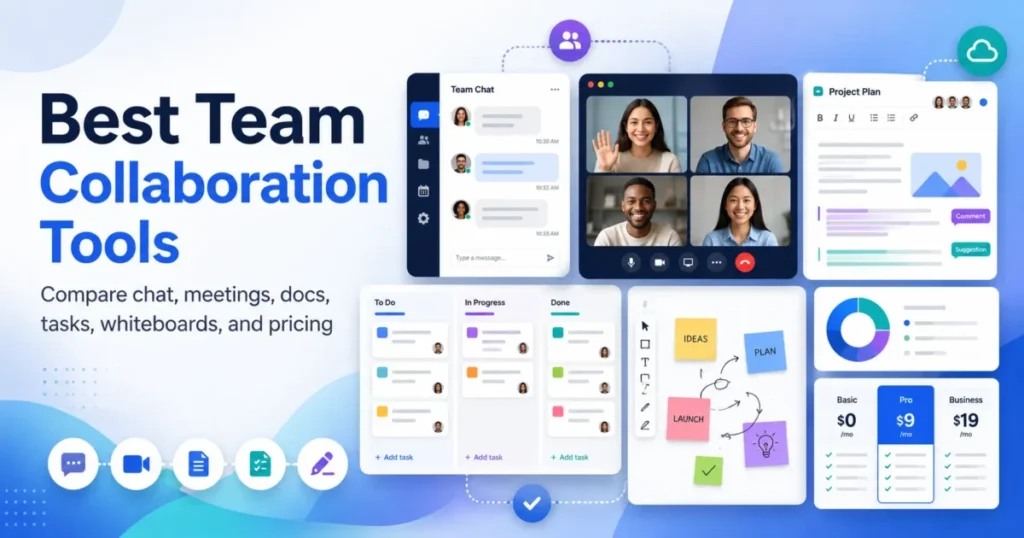
Here is a realistic, no-nonsense breakdown of the top 10 collaboration platforms dominating the workplace in 2026—including what each app does best, where it shines, where it falls short, and who should actually spend money on it.
                    ┌───────────────────────────────┐
                    │  What is your main headache?  │
                    └───────────────┬───────────────┘
                                    │
         ┌──────────────────────────┼──────────────────────────┐
         ▼                          ▼                          ▼
┌──────────────────┐       ┌──────────────────┐       ┌──────────────────┐
│ Lost Messages &  │       │ Missed Deadlines │       │ Messy Documents  │
│  Context Switching│       │  & Unclear Tasks │       │  & Scattered Files│
└────────┬─────────┘       └────────┬─────────┘       └────────┬─────────┘
         │                          │                          │
         ▼                          ▼                          ▼
┌──────────────────┐       ┌──────────────────┐       ┌──────────────────┐
│ Communication    │       │ Project Hubs     │       │ Document Hubs    │
│ Slack / Teams    │       │ Asana / ClickUp  │       │ Notion / Google  │
└──────────────────┘       └──────────────────┘       └──────────────────┘
1. Slack – Best for Fast-Paced Team Communication
Slack remains the undisputed champ for daily workplace banter, fast-paced chatter, and instant team communication. Its channel-based setup lets you organize discussions by specific projects, departments, clients, or even fun off-topic interests (like #pets-of-slack or #coffee-nerds).
Instead of letting important decisions rot inside private email threads, Slack makes conversations open, searchable, and easy to catch up on. If your team relies heavily on fast, back-and-forth communication throughout the day, Slack is hard to beat.
- Best for: Fast-moving startups, remote agencies, tech teams, and marketing groups that live on instant messaging.
- Key Strengths:
- Intuitive, highly organized channels and clean message threads.
- Instant drop-in voice and video “Huddles” for spontaneous chats.
- Powerful search filters that let you unearth old files or conversations in seconds.
- Thousands of app integrations to pull notifications directly into your chat feeds.
- The Reality Check: Because messaging is so easy, Slack can quickly turn into a noisy distraction if your team doesn’t set clear guidelines around when to turn off notifications and focus on deep work.
2. Microsoft Teams – Best for Corporate & Enterprise Ecosystems
If your company already lives inside the Microsoft 365 world, Microsoft Teams is an absolute no-brainer. It blends group chat, video meetings, cloud file storage, and deep Office app integration into one massive corporate hub.
Instead of buying separate apps for chat, video, and storage, Teams brings everything under one roof. It is built from the ground up for enterprise security, strict administrative controls, and large-scale organizational structure.
- Best for: Mid-to-large businesses, corporate enterprises, financial institutions, and organizations tied to Word, Excel, and Outlook.
- Key Strengths:
- Seamless live co-editing on Word documents, Excel sheets, and PowerPoint decks directly inside the app.
- Enterprise-grade security, compliance, and strict file permission controls.
- Heavy-duty video conferencing that links up seamlessly with your Outlook calendar.
- Included free or at a heavily discounted rate with most corporate Microsoft 365 plans.
- The Reality Check: The interface can feel a bit clunky, rigid, and overly formal compared to lighter, modern tools like Slack or Trello.
3. Asana – Best for Structured Project Management
Asana shines when you need to take big, messy projects and break them down into clear, manageable steps. It provides fantastic bird’s-eye views of project timelines, team workloads, and task deadlines.
If your team’s biggest operational problem is missed deadlines, vague task ownership, or people constantly asking “what should I be working on today?”, Asana brings instant structure to the table.
- Best for: Marketing departments, creative agencies, project managers, and growing businesses handling complex, multi-step campaigns.
- Key Strengths:
- Multiple visual project layouts (Lists, Kanban Boards, Gantt Charts, Workload View).
- Explicit task assignments, clear due dates, and task dependency tracking (Step B can’t start until Step A is finished).
- Automated workflows that assign tasks and move statuses forward without manual clicking.
- Portfolio dashboards that let managers see high-level progress across dozens of active projects.
- The Reality Check: It is strictly focused on task tracking, so you will still need a separate tool like Slack or Zoom for informal team conversations and live video calls.
4. Trello – Best for Simple, Lightweight Visual Tracking
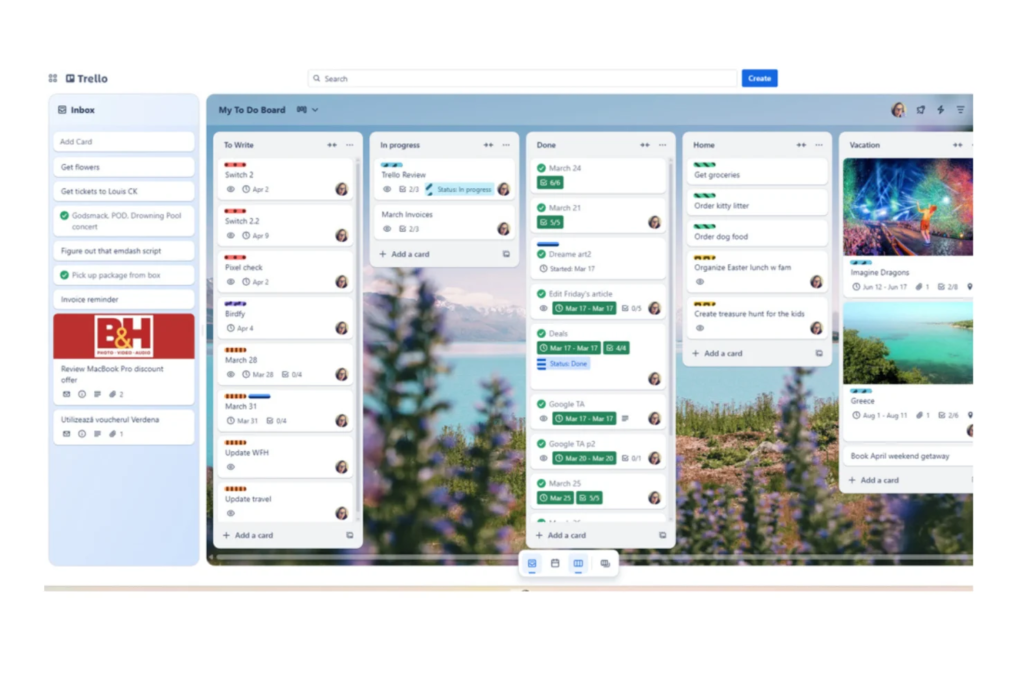
Trello keeps things refreshingly simple with its iconic card-and-board setup. Built around the classic Kanban management style, you create columns (like “To Do,” “In Progress,” and “Done”) and drag cards across the screen as work moves forward.
It takes roughly three minutes to learn how to use Trello, making it the ultimate tool for teams that hate complicated software setups and just want a clear visual picture of their work.
- Best for: Freelancers, small businesses, editorial content teams, and simple linear processes.
- Key Strengths:
- Zero learning curve—anyone can start building a functional board immediately.
- Super clean drag-and-drop card interface.
- Cards support detailed checklists, attachments, custom labels, and due dates.
- “Butler” automation that handles repetitive actions automatically (like moving a card when a checklist is completed).
- The Reality Check: When you try to scale Trello across massive, highly complex projects with hundreds of dependent tasks, the boards quickly become cluttered and difficult to manage.
5. Notion – Best for Flexible All-in-One Knowledge Hubs
Notion takes a flexible, building-block approach to team work. Instead of forcing your team into a rigid, pre-built template, it gives you a blank canvas where you can build internal wikis, project trackers, design docs, meeting notes, and relational databases side by side.
It is widely celebrated for turning messy Google Drive folders and scattered internal documents into clean, beautifully organized company search engines.
- Best for: Startups, creative teams, knowledge workers, and documentation-heavy businesses that want a custom workspace.
- Key Strengths:
- Unmatched flexibility—mix text documents, databases, task boards, and media on a single page.
- Internal wikis and company handbooks that replace messy, unorganized file folders.
- Interconnected databases that let you view information in multiple ways (as a list, table, board, or calendar).
- Integrated AI writing tools to draft content, summarize meeting notes, and find information fast.
- The Reality Check: Because it is a blank canvas, setting up a good Notion workspace requires careful planning. Without clear organization rules, it can quickly turn into a digital wild west.
6. ClickUp – Best for Feature-Packed, Highly Custom Workflows
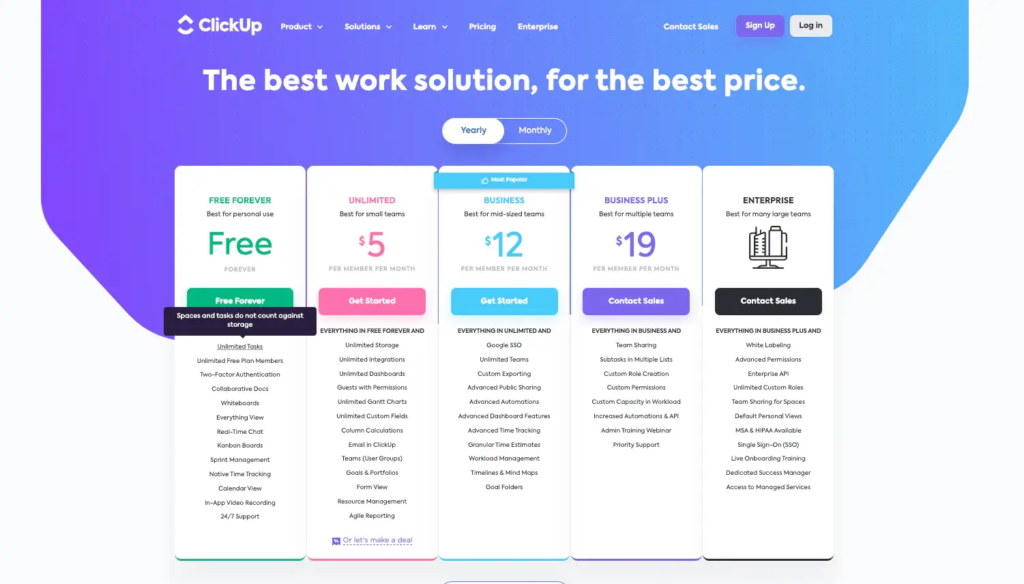
ClickUp aims to be the “one app to replace them all.” It packs an absolute ton of functionality into a single subscription—combining tasks, docs, goals, whiteboards, time tracking, chat, and mind maps.
While it definitely takes time to configure, its customization options are practically limitless. If you want a single app that can handle almost every operational detail of your business, ClickUp is built for the job.
- Best for: Operations heads, tech-savvy teams, and scaling businesses that want complete control over their workflows.
- Key Strengths:
- Deeply customizable views, custom statuses, and custom data fields for every task.
- Built-in native time tracking, document management, and interactive whiteboards.
- Advanced goal tracking, sprint planning, and workload management dashboards.
- Excellent value for teams looking to eliminate three or four separate software subscriptions.
- The Reality Check: The sheer volume of features, settings, and buttons can feel overwhelming for non-technical team members during the first few weeks.
7. Monday.com – Best for Visual Workflows & Operations
Monday.com turns complex project tracking into vibrant, color-coded visual dashboards. It is wildly popular because non-technical team members can jump right in and instantly understand what is going on without feeling bogged down by complex menus.
You can customize its flexible boards to track almost anything—from marketing campaigns and sales pipelines to event planning and software development sprints.
- Best for: Operations teams, sales departments, creative agencies, and cross-functional teams that love clean visuals.
- Key Strengths:
- Extremely attractive, easy-to-read visual boards with custom color-coded status tags.
- Simple, plain-English automation builders (e.g., “When status changes to Approved, notify Manager”).
- Executive dashboards that aggregate data across multiple team boards in real time.
- Rich library of pre-built templates for almost every industry niche.
- The Reality Check: Pricing tiers can get expensive fairly quickly as your team grows, especially if you need access to advanced automation features and reporting tools.
8. Basecamp – Best for Calm, Straightforward Team Projects
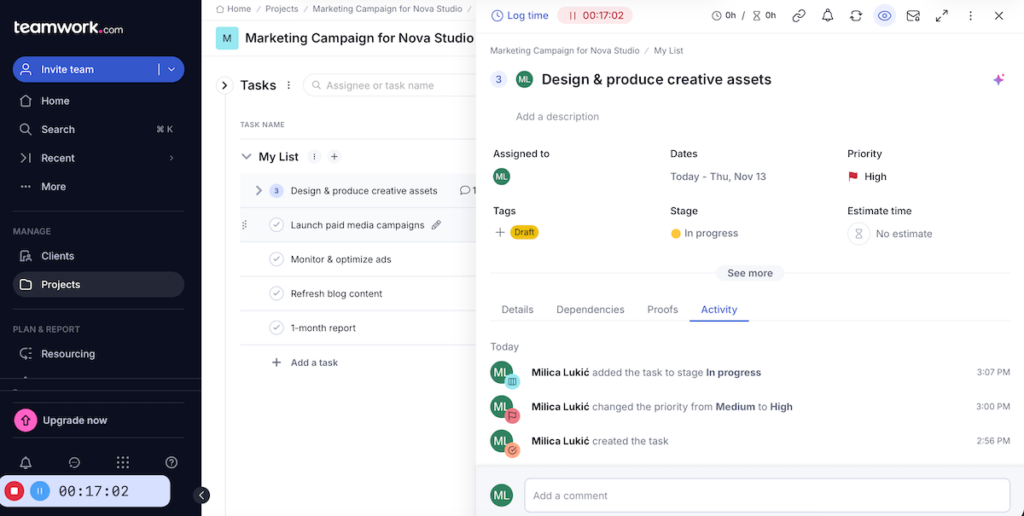
Basecamp deliberately rejects the trend of overwhelming feature lists in favor of simple, calm, and predictable project management. Every project in Basecamp comes with six basic tools: a message board, a to-do list, a schedule, a document repository, a group chat, and automated check-in questions.
It intentionally avoids complex tracking features like Gantt charts or detailed resource allocations to keep teams focused on finishing real work without added stress.
- Best for: Small agencies, client-facing teams, and groups suffering from severe app fatigue.
- Key Strengths:
- All-in-one simple layout that keeps all project assets in one predictable place.
- Unique flat-rate pricing model that doesn’t penalize you with extra fees as you hire more people.
- Excellent client access settings that let you share progress safely without exposing internal team chats.
- Built-in automatic check-ins to replace annoying, unnecessary status meetings.
- The Reality Check: If you rely heavily on complex visual charts, advanced workload management, or deep automation, Basecamp’s simple feature set will feel too limited.
9. Google Workspace – Best for Real-Time Document Co-Authoring
When your team spends hours writing reports, building pitch decks, or crunching numbers in spreadsheets, Google Workspace remains the gold standard. Docs, Sheets, and Slides allow multiple people to jump into the exact same file simultaneously, drop comments, tag teammates, and write together live in real time.
Combined with Google Drive for cloud storage, Gmail for external communication, and Google Meet for quick calls, it forms the foundational backbone for thousands of modern businesses.
- Best for: Remote teams, educators, content creators, startups, and cloud-first organizations.
- Key Strengths:
- Industry-leading real-time file editing with instant, automatic cloud saving.
- Simple share settings and permissions that make collaborating with external partners painless.
- Seamless integration across Gmail, Google Calendar, Drive, and Meet.
- Smart comment tagging that lets you assign direct action items inside documents.
- The Reality Check: It lacks dedicated project management features—you will still need a proper tool like Asana or Trello to track complex, multi-step project workflows.
10. Zoom – Best for High-Reliability Video & Remote Meetings

Best for: Remote-first companies, distributed teams, sales departments, and client-facing presentations.
Key Strengths:
Rock-solid video and audio stability, even on slow or spotty internet connections.
Smart AI Companion that automatically generates meeting transcripts, summaries, and action item lists.
The Reality Check: Zoom Fatigue is real. If every conversation turns into a scheduled 30-minute video call, your team’s energy and productivity will plummet.
While Zoom started out strictly as a video calling tool, it has quietly grown into a complete collaboration suite featuring team chat, virtual whiteboards, phone systems, and AI-powered meeting summaries.
When you need a video call that just works without annoying audio lag, frozen video screens, or embarrassing connection drops, Zoom remains the most reliable option on the market.
At-a-Glance Platform Comparison
To help you compare your options quickly, here is how the top 10 tools stack up side by side:
| Tool | Primary Focus | Best Suited For | Key Standout Feature |
| Slack | Team Communication | Tech teams, startups, fast-paced remote orgs | Organized channels & spontaneous voice Huddles |
| Microsoft Teams | Corporate Ecosystem | Companies heavily invested in Microsoft 365 | Live co-editing on native Word/Excel files |
| Asana | Project Management | Marketing agencies, project leads, creative teams | Clear task dependencies & workload balancing |
| Trello | Visual Task Tracking | Small teams, freelancers, simple workflows | Drag-and-drop Kanban card boards |
| Notion | Knowledge Workspace | Knowledge workers, startups, content creators | Modular pages, wikis & relational databases |
| ClickUp | Advanced Management | Operations heads, scaling teams, tech groups | Deep customization & native time tracking |
| Monday.com | Visual Workflows | Operations, sales teams, creative departments | Color-coded status boards & plain-English automation |
| Basecamp | Calm Project Hubs | Small agencies, client-facing teams | Simple flat-rate pricing & all-in-one layout |
| Google Workspace | Cloud File Co-Authoring | Content teams, remote businesses, schools | Smooth real-time document editing |
| Zoom | Video & Remote Meetings | Distributed teams, sales reps, external webinars | Reliable video stability & AI meeting notes |
How to Choose the Right Tool Without Regretting It Later
Picking software for your team isn’t about buying the app with the longest feature list or the slickest marketing pitch. It is about choosing something your team will actually open, use, and enjoy every single morning.
Here is a practical, four-step decision framework to keep you from wasting money on software nobody uses:
Step 1: Audit Your Team’s Actual Daily Friction
Take a step back and look at where your work breaks down right now.
- Are deadlines being missed because nobody knows who is responsible for what? You need a project management hub like Asana or Monday.com.
- Are important updates getting lost because conversations are scattered across texts, emails, and group chats? Look at a dedicated communication hub like Slack.
- Are files getting overwritten and lost in messy cloud folders? Focus on Notion or Google Workspace.
Step 2: Respect Your Current Tech Stack
Don’t build a digital island. If your business already pays for Microsoft 365 or Google Workspace, explore those options fully before adding brand-new software bills to your credit card. Whatever new app you pick must play nicely with the core tools your team already uses every day.
Step 3: Ease of Use Always Trumps Fancy Features
An ultra-advanced platform with 500 features is completely useless if your team finds it too tedious to update. If software feels like a painful administrative chore, people will secretly go back to tracking work on spreadsheets, sticky notes, or private messaging apps. Always prioritize clean, intuitive design over endless settings menus.
Step 4: Watch Out for Hidden Scaling Costs
A platform that costs $8 per user per month sounds like a bargain when you only have five employees. But as your team grows to 30 or 50 people, that bill compounds fast. Watch out for mandatory feature tiers, administrative add-ons, and per-user pricing jumps before committing your company long-term.
Practical Benefits: What You Actually Gain

Investing in a proper collaboration hub isn’t just about looking modern; it delivers real, measurable improvements to your daily working life:
- Fewer Useless Status Meetings: When everyone can see task progress on a live visual board, you can completely eliminate those painful 30-minute “so, what are you working on today?” standup calls.
- Clear Accountability: Assigning explicit task owners and clear target dates stops people from playing the blame game when an important deliverable falls through the cracks.
- Centralized Knowledge: Keeping project files, meeting notes, conversation threads, and updates tied to the actual task means nobody has to spend half their day asking “where is the latest version of that file?”
- Painless Onboarding for New Hires: Instead of spending two weeks explaining where everything lives, you can hand a new teammate a clean link to your organized Notion wiki or Slack channel archive and get them up to speed in days.
- Smarter Hybrid and Remote Work: Team members can drop detailed updates asynchronously, allowing people to focus on deep work without needing to sit in live meetings all day long.
What to Look For in 2026
Collaboration software is evolving rapidly. Teams are moving away from passive storage apps and heading toward smart, active systems that actively help you organize and execute work.
When evaluating a new platform, keep an eye out for these modern essentials:
- Contextual AI Assistance: The best tools don’t just host text; they actively help you summarize long, hundred-message chat threads, pull key action items out of meeting recordings, and draft initial project outlines.
- Simple No-Code Automations: Look for platforms with intuitive automation builders that let you trigger alerts, update statuses, and move tasks between apps automatically without needing to hire a developer.
- Universal Smart Search: A search bar that can scan across your messages, task descriptions, attached PDFs, cloud spreadsheets, and meeting transcripts in one go will save your team hundreds of hours every year.
At the end of the day, there is no single “perfect” collaboration platform that works for every single company on earth. The best tool is simply the one that gets out of your team’s way, cuts out daily administrative noise, and helps everyone ship great work together with as little stress as possible.
Collaboration Tools 2026: Work Better Together With Smart Tools
Modern work is no longer limited to people sitting in the same office. Teams Collaboration…

Productivity 2026: Smart Strategies to Work Better & Faster
Being productive doesn’t mean filling every minute of the day with work. In 2026, productivity…

Tech Insights 2026: Latest Technology Trends & Innovations
Technology is no longer something that simply runs in the background. Tech Insights It is…

Remote Work Guide 2026: How to Stay Productive and Organized
Working remotely in 2026 isn’t just about sitting at your kitchen Remote Work Guide 2026:…
AI Tool Battles 2026: Compare the Best Tools Head-to-Head
You read a landing page, and it sounds incredible. You sign up, hand over your…

15 Smart Technology Trends to Watch in 2026
Smart technology is no longer just about connected devices—it is becoming the foundation of how…